Sõidupäevik template and sample 2026
Fill in the Estonian mileage log on this page and save it as PDF or Excel. Below are a filled-in sample, a blank form to print and what to write in each column, following Government Regulation No. 164.
Your data stays in your browser: the page sends nothing to a server. An unfinished form is kept in this browser so you can continue later.
Fill in the trip log
- Business distance (km)
- 0 km
- Tax-free compensation
- €0.00
- Above the cap (fringe benefit)
- €0.00
Rate €0.50/km, tax-free up to €550 per calendar month per employer; counted month by month. Compensation calculator →
PDF: your browser's print dialog opens — choose “Save as PDF”. The Excel file also opens in Google Sheets, Numbers and LibreOffice.
Filled-in sõidupäevik sample
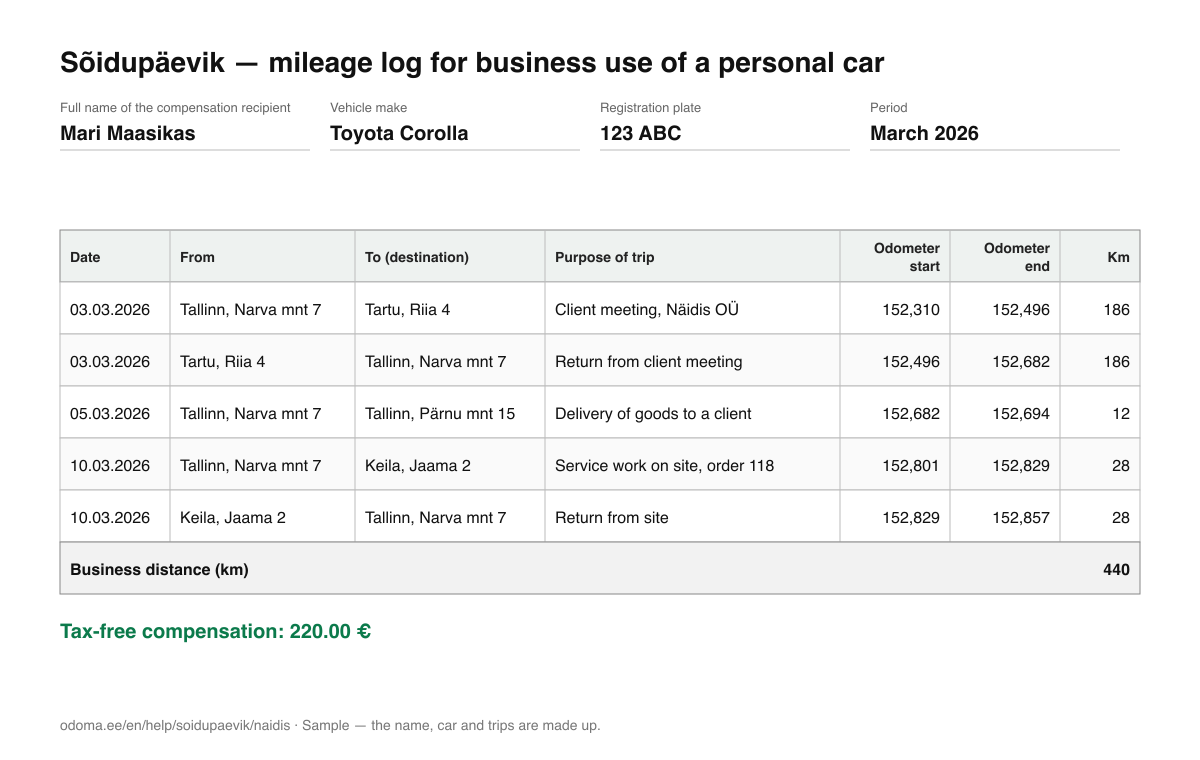
A correct sõidupäevik looks like this: the recipient and the car in the header, every business trip on its own row, the odometer reading at the start and end.
| Date | From | To (destination) | Purpose of trip | Odometer start | Odometer end | Km |
|---|---|---|---|---|---|---|
| 03.03.2026 | Tallinn, Narva mnt 7 | Tartu, Riia 4 | Client meeting, Näidis OÜ | 152,310 | 152,496 | 186 |
| 03.03.2026 | Tartu, Riia 4 | Tallinn, Narva mnt 7 | Return from client meeting | 152,496 | 152,682 | 186 |
| 05.03.2026 | Tallinn, Narva mnt 7 | Tallinn, Pärnu mnt 15 | Delivery of goods to a client | 152,682 | 152,694 | 12 |
| 10.03.2026 | Tallinn, Narva mnt 7 | Keila, Jaama 2 | Service work on site, order 118 | 152,801 | 152,829 | 28 |
| 10.03.2026 | Keila, Jaama 2 | Tallinn, Narva mnt 7 | Return from site | 152,829 | 152,857 | 28 |
The gap between 152 694 and 152 801 is personal driving: it is not entered in the log, but the odometer readings show honestly that it happened.
Blank form to print and Excel template
- Blank sõidupäevik form (PDF, A4)
Print it and fill in by hand: header, 16 rows, totals and signature.
- Sõidupäevik template in Excel (.xlsx)
Template with formulas: kilometres, compensation and the cap calculate themselves.
What to write in each column
There is no official form — EMTA looks at the content. Government Regulation No. 164 (§ 4) requires the following in the log.
- Header: name and vehicle
- Full name of the compensation recipient, vehicle make and registration plate. The period (month) helps the employer match the log to the right payroll month.
- Date
- The date of every business trip. Several trips on one day go on separate rows.
- From and to
- Start and destination so that an outsider could find the route on a map: town and address or the organisation's name.
- Purpose of trip
- Short and specific: “Client meeting, Näidis OÜ”, “Delivery of goods”. The word “business” alone does not describe a purpose.
- Odometer at start and end
- The odometer reading at the start and end of every trip. If the next trip's start does not match the previous end, there was personal driving in between — that is allowed, as long as the numbers are true.
- Kilometres
- End reading minus start reading. The form calculates it if you leave the cell empty.
Common mistakes
- The log is written at the end of the month from memory — EMTA does not accept a log reconstructed after the fact; fill it in as you go.
- Odometer readings are missing or rounded — without them business and personal kilometres cannot be checked.
- The purpose just says “work” or “client” — an inspector has to understand why the trip was needed.
- Personal trips sit among business trips — leave them out or mark them clearly as personal.
- There is no written decision or order by the employer to pay compensation — the log alone is not enough for a tax-free payment.
Rather not write every trip by hand?
Odoma Tracker is a free iOS and Android app that keeps your mileage log (sõidupäevik) automatically: it records trips on the phone with no GPS device and no account, and splits them into business and personal by your work schedule. The trip log is ready as a PDF for your employer or accountant at any moment.
See how Odoma Tracker works →Frequently asked questions
- Is there an official sõidupäevik form in Estonia?
- No. Regulation No. 164 says what data the log must contain but sets no form. A paper notebook, Excel, the PDF from this page or an app report all work — as long as the mandatory data is there.
- Can I keep a sõidupäevik in Excel?
- Yes. Download the filled-in form as Excel from this page, or the blank template with formulas. What matters is filling it in as you go, not at the end of the month from memory.
- Is a sõidupäevik saved as PDF valid?
- Yes — EMTA looks at the content, not the format. Print the PDF or send it to your employer; if a signature is needed, sign on paper or digitally.
- Is the data I type stored anywhere?
- Only in your browser, so you can continue an unfinished form. Nothing is sent to a server. On a shared computer, press “Clear” when you are done.
- Does every trip need its own row?
- Yes: each business trip has its own date, destination, purpose and odometer readings. That is how the log matches the car's actual mileage.
This page is general information, not legal, accounting or tax advice. Prepared by Odoma Digipädevuse Selts. Sõidupäevik rules, rates and sources →